Intervals Companion

About
Intervals Companion is a full-featured iOS and watchOS companion for Intervals.icu. It brings your fitness data to iPhone, Apple Watch, iPad, and Mac with glanceable widgets, deep health integration, and automatic two-way sync between Apple Health and Intervals.icu.
Viewing Your Data
Browse your training load, fitness, fatigue, and form at a glance. View detailed activity breakdowns, performance charts, best efforts, workout plans, and wellness trends — all sourced live from your Intervals.icu account. Configurable home screen, lock screen, and Apple Watch widgets keep your most important metrics always visible and update automatically in the background. Silent push notifications trigger refreshes whenever new activities or wellness data arrive on Intervals.icu, so widgets stay current without manual intervention.
Social Feed & Followed Athletes
Follow other athletes on Intervals.icu and browse their recent activities in a scrollable feed. Tap into any activity to see full details, charts, and performance data.
Chat
Stay connected with your coach and training group through Intervals.icu's built-in chat. Read and reply to messages directly from the app, with conversations organized by channel. Push notification alerts are delivered in real time when new messages arrive, so you never miss an update from your coach or teammates — even when the app is closed.
Workout Management & Apple Watch
Planned workouts from Intervals.icu can be viewed, managed, and sent directly to Apple Watch. Scheduled workouts appear in the app with full step-by-step structure, and can be pushed to the watch for guided execution — including target power, pace, or heart rate zones for each interval. After completing a workout on Apple Watch, the recorded data syncs back to Intervals.icu automatically.
Intervals.icu → Apple Health
Activities recorded on connected devices are automatically written to Apple Health as workouts, keeping your Health app complete. Supported sources include Garmin, Zwift, Wahoo, MyWhoosh, Rouvy, Hammerhead, and TrainingPeaks Virtual.
Apple Health Workouts → Intervals.icu
Workouts recorded natively on Apple Watch can be synced back to Intervals.icu automatically. The app monitors Apple Health in the background and uploads new workouts as FIT files, complete with heart rate, GPS, cadence, and other available data streams. This makes it easy to get Apple Watch workouts into Intervals.icu without using additional apps.
Apple Health Metrics → Intervals.icu
Daily wellness and sleeping data is read from Apple Health and synced to your Intervals.icu wellness log automatically each morning. The following metrics are supported (each can be individually enabled or disabled in Settings):
- Heart: Resting heart rate, HRV (SDNN and rMSSD), sleeping heart rate, Baevsky Stress Index
- Sleep: Total sleep, sleep stages (light, deep, REM), breathing disturbances, sleep score
- Body: Weight, body fat %, waist circumference
- Activity: Steps, active energy, basal energy, VO₂ max
- Vitals: Blood oxygen (SpO₂), respiratory rate, blood pressure, blood glucose
- Nutrition: Calories consumed, hydration, protein, carbohydrates, fat
- Scores: Readiness score, sleep score (see Score Logic)
Syncs run in the background using HealthKit background delivery, so your Intervals.icu wellness log is updated without opening the app.
Make sure to enable background app refresh and notifications to take full advantage of automatic syncing and widget updates.
Tip: On Apple Watch Series 11, Ultra 3 and earlier, enabling AFib History in the Health app results in significantly more thorough overnight HRV and heart rate data — Apple Watch records continuous beat-to-beat measurements throughout the night rather than periodic samples. Apple Watch Series 12 and Ultra 4 record frequent overnight HRV and heart rate without it.
Contact
If you have an idea for a feature, a bug to report or need help, feel free to reach out:
Frequently Asked Questions (FAQ)
1. Why aren't my metrics or activities syncing with Apple Health?
Sync issues are almost always caused by permission issues. Check each of the following:
- Intervals.icu OAuth login token permissions — when you logged in, Activities and Wellness Data need both Read and Update checked. If you're unsure, logout and log back in to re-grant permissions.
- iOS Health permissions — go to iOS Settings → Privacy & Security → Health → Intervals Companion and tap Turn On All.
2. Why are my Strava activities missing from Intervals Companion?
If you're using Strava as your data source for Intervals.icu,
your activities may not appear in Intervals Companion.
This is due to Strava's data policy, which
prevent third-party apps like Intervals Companion from accessing detailed
activity-level data through the Intervals.icu API.
To fix this:
- Go to your Intervals.icu account settings
- Connect your services directly (e.g., Garmin, Wahoo, Zwift, etc.)
This ensures that full activity data flows into Intervals.icu and becomes visible in Intervals Companion.
3. Why is my form data in the app different from the website?
Both the Intervals.icu website and the app allow you to choose how your Form is calculated:
- Absolute value: Fitness - Fatigue
- Percentage: (Fitness - Fatigue) / Fitness
Make sure the setting in the app matches your preference on the website. You can find this setting in the app under Settings > Fitness Settings > Form Calculation.
4. Why do I get a ‘data streams 403 error’ when viewing activity details?
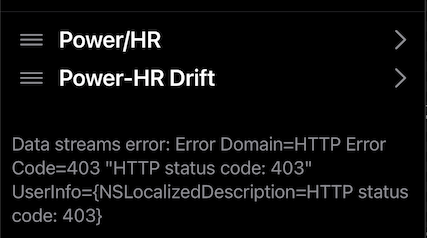
This error is caused by the Intervals.icu backend stream data API endpoint getting out of sync with your authentication token.
To fix this:
- Open the app settings
- Tap the Full Logout button
- Log back in again
This will generate a new authentication token and resolve the issue.
Privacy Policy
Last updated: November 13, 2026
This policy covers Intervals Companion, an independent iOS and watchOS app that works with your intervals.icu account. This app is not made, sponsored or endorsed by intervals.icu.
This app does not sell data, does not show advertising, and has no third-party analytics or tracking. Questions or requests can go to intervalscompanion@mcewen.us.
Data kept on your device
- Your intervals.icu sign-in, and your Strava connection if you add one, are stored in the iOS Keychain.
- Cached intervals.icu data, so screens load quickly.
- Your settings. If you turn on settings sync, they are copied through your own iCloud account.
Data this app's server stores
- Notifications: your intervals.icu athlete ID and name, paired with Apple's randomized device identifier, so the app can refresh in the background and send alerts through Apple's Push Notification Service. Signing out of the app deletes these records.
- Usage statistics, linked to your athlete ID and used only to understand how the app is used and to keep its use of intervals.icu efficient: the app version, when the app was first and last opened, whether it is a TestFlight build, your Intervals Companion+ status, and how many intervals.icu requests and cache hits it made over the last day and week.
- Health disclaimer: a record that you accepted the in-app health disclaimer (athlete ID, device identifier, app version and time).
- Activity changes: the IDs of intervals.icu activities you edit or delete, so the change can reach Apple Health. These are removed after one day.
Apple Health
This app reads and writes Apple Health data only for the types you allow. Health data is sent to your own intervals.icu account only when you turn on a sync that does so. It is never sent to this app's server.
AI features
AI features use Apple's on-device model or Apple's Private Cloud Compute, or another AI provider you have configured. This app's server never receives the data they use. Strava data is never used by any AI feature.
Strava
Connecting Strava is optional. It lets this app upload your own activities to your own Strava account, and, if you turn it on, add a jump summary to a ride's Strava description. This app does not download your Strava activities.
- Stored, on your device only: the Strava sign-in tokens, your Strava name, and the Strava IDs of activities this app uploaded. The IDs are deleted after 7 days. The token exchange passes through this app's server, which does not store or log it.
- Used only to upload your activities and add jump summaries. It is never shared, sold, used for advertising, analytics or AI, or shown to anyone but you.
- To withdraw consent, tap Disconnect Strava in the app or revoke access in your Strava settings. Disconnecting deletes all Strava data this app holds. You can also email a deletion request; it is completed and confirmed in writing within 30 days.
- Strava may collect and use data about how this app uses the Strava API, as described in the Strava API Agreement. See the Strava Privacy Policy.
Who receives data
Data goes only where you direct it: intervals.icu, Strava and Apple (Health, iCloud, Push Notifications and Private Cloud Compute, or an alternative AI endpoint, chosen by you). No other third party receives your data.
Your data
To see, correct or delete the data this app's server holds about you, email intervalscompanion@mcewen.us with your intervals.icu athlete ID.
Security
All connections use HTTPS. Sign-in credentials are stored in the iOS Keychain.
Changes
Changes to this policy are posted on this page with a new date. If this app starts collecting a new kind of Strava data, it will ask for your consent first.